The Microsoft employee stock purchase plan (ESPP) is a substantial benefit, and a real wealth-building tool for the employees who use it well - though it builds up a position in a single stock. The plan buys Microsoft stock at the end of every quarter at a 10% discount. It's built to run on its own: at the end of each offering you're automatically re-enrolled in the next one, so the payroll deduction keeps going and a new block of shares arrives four times a year.
Over a few years that adds up, and it adds up in the same stock your RSUs are already in. Microsoft employees bought 5 million shares through the plan in the fiscal year ended June 30, 2026, at an average price of $382.92. The 10% discount is real money, and capturing it well comes down to a handful of decisions: how much to contribute, what to do with the shares when they land, and how to report the sale. This walks through those decisions in six steps.
How the Microsoft ESPP works
The plan runs in three-month offerings that start on January 1, April 1, July 1 and October 1. You authorize a payroll deduction of a whole percentage from 1% to 15%, that money accumulates in an account through the quarter, and on the last business day of the offering you're treated as having bought as many shares as the balance of your account will pay for, fractional shares included.
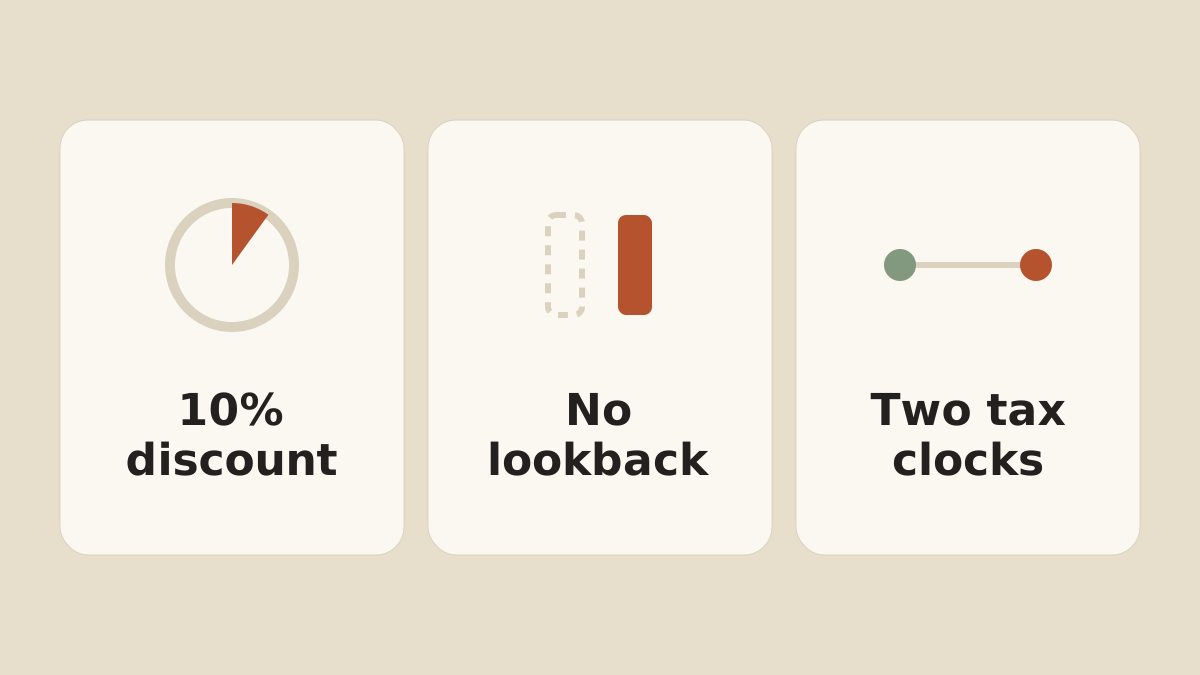
The purchase price is 10% below the market price of Microsoft stock on the last Nasdaq trading day of the offering. That single sentence carries more weight than it looks like it does. The Microsoft ESPP has no lookback. The price is fixed on the purchase day alone, so the discount is 10% of that day's closing price and nothing more. Our video on how an ESPP discount and lookback work in general covers these plans.
Eligibility is broad. Most employees of Microsoft and its designated subsidiaries can take part, as long as they're employed on the last business day before an offering date.
| Term | Definition |
|---|---|
| Offering length | Three months, starting Jan 1, Apr 1, Jul 1, Oct 1 |
| Purchase price | 10% below the closing price on the last Nasdaq trading day of the offering |
| Lookback | None. The Microsoft ESPP has no lookback provision, so the price is set on the purchase day |
| Contribution rate | A whole percentage from 1% to 15% of eligible pay |
| Annual limit | Purchase rights cannot accrue above $25,000 a year, measured at the offering-date price |
| Per-offering limit | 2,000 shares |
| Re-enrollment | Automatic each quarter unless you opt out |
1. Contribution limits
Two separate limits apply, and for most people in this audience the one that actually binds is not the one they're looking at. The first is the 15% of pay you elect. The second is a rule from the tax code: your right to purchase stock cannot accrue at a rate above $25,000 a year, and that $25,000 is measured using the share price on the offering date, not the purchase date.
Take a hypothetical employee with $200,000 of eligible pay, and assume the stock opens the year's offerings around $400. Electing the full 15% sets aside $30,000 for the year, which is above the $25,000 IRS limit. That limit allows about 62 shares across the four offerings, which at a purchase price near $360 comes to roughly $22,300 of actual spending. The rest of the election is money the plan can't use. The plan document says purchases are subject to the Section 423 limits.
The second thing to get right is what counts as pay. The plan defines compensation as total cash performance-based pay. Salary, wages, performance bonuses, commissions, incentive compensation and overtime are in. Income from any stock plan is explicitly out. If your package is $200,000 of cash and $250,000 of vesting RSUs, your 15% is calculated on the $200,000, not on the $450,000 you think of as your compensation. Our guide to RSU tax strategies covers how vesting income lands on a W-2, and the mechanics are the same wherever you work.
2. What the 10% discount is worth
The discount is arithmetic, and it's worth being precise about it. On the hypothetical prices above, paying $360 for a share priced at $400 is $40 of value on $360 of your own money.
What the plan does not give you is any protection on the way out. The discount is fixed at purchase, and from that moment you hold ordinary Microsoft stock that can move in either direction before you sell. A plan with a lookback softens that by pricing off the lower of two dates. Microsoft prices off only the purchase date. So the longer the gap between the purchase and the sale, the less the 10% has to do with what you end up with.
3. What to do with the shares
The shares arrive on a schedule, so the decision about them can be made on a schedule too. The question is how much Microsoft stock you want to own, and the ESPP purchases are only one input. If you're holding vested RSUs as well, the plan is quietly adding to a position that's already there.
Selling at purchase turns roughly the discount into cash, before tax and subject to whatever the price does between the purchase and the sale, and it stops the share count growing. Holding keeps the discount invested in a single stock and starts the clocks described in the next step. One common approach is to cap Microsoft at a set percentage of your investable net worth and let the ESPP purchases top that position up only to the extent there's room, selling the rest. Another is to sell each purchase as it lands and treat the discount as what it is, a quarterly addition to cash flow.
Worth knowing is that the plan has a default, and the default is no decision at all. Automatic re-enrollment means shares keep arriving. If nothing is ever sold, the number of shares you hold keeps climbing.
If you want to step out of the program, you can do so at any time before the first day of the last calendar month of the quarter, and the balance in your account is refunded. After that the purchase happens. Withdrawing also keeps you out of the next offering until you re-enroll.
4. Qualifying vs. Disqualifying Disposition
One of the more confusing aspects of this program is the qualifying versus disqualifying disposition. A disposition is any sale, gift or transfer of the shares. A qualifying disposition is one that has cleared both holding periods and gets the better tax treatment. A disqualifying disposition is one that hasn't. For Microsoft ESPP shares, qualifying means selling more than two years after the offering date and more than one year after the purchase date. Because Microsoft's offerings are only three months long, the two-year clock is the one that binds: it expires about twenty-one months after the purchase.
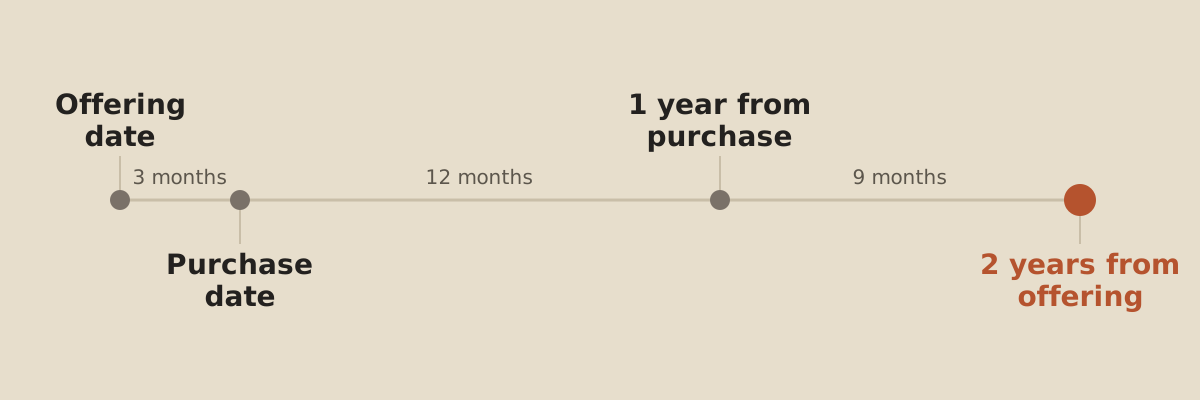
The timeline shows when a sale becomes a qualifying disposition, not whether selling is a good idea. The share price can fall while you wait.
Clearing both clocks does not make the discount tax-free. On a qualifying disposition you report ordinary income equal to the lesser of two numbers: your actual gain, or the discount measured at the offering date. Everything above that is capital gain.
Miss either clock and it's a disqualifying disposition. Then the ordinary income is the full discount measured on the purchase day, and the amount is not limited by what you actually made on the sale.
Here's how those paths compare on a hypothetical purchase. Assume the stock is $400 on the offering date and $440 on the purchase date, so the purchase price is $396. The offering-date discount is $40 a share and the purchase-date discount is $44 a share.
| Sale | Disposition | Ordinary income per share | Capital gain or loss per share |
|---|---|---|---|
| Sold at $500, both clocks cleared | Qualifying | $40 | $64 long-term gain |
| Sold at $500, 18 months after purchase | Disqualifying | $44 | $60 long-term gain |
| Sold at $380, 2 months after purchase | Disqualifying | $44 | $60 short-term loss |
The third row is the one people don't see coming. The stock fell below what you paid, and you still report $44 a share of ordinary income, because on a disqualifying disposition that income isn't capped by your gain. The offsetting capital loss lands in a different bucket, and once it's used against your capital gains, only $3,000 a year of any remaining loss can go against ordinary income.
A last piece of housekeeping: Microsoft isn't required to withhold on the compensation income from an ESPP sale, whichever disposition it turns out to be, and it isn't subject to Social Security or Medicare tax either. The tax on that piece is yours to plan for. Our guide to the safe harbor rules covers how to stay clear of an underpayment penalty.
5. Microsoft's trading policy
Buying through the ESPP and selling what it buys are governed by different rules, and this catches people out. Microsoft's insider trading policy lists ESPP purchases under an existing election as one of the few transactions that are permitted even when you hold material nonpublic information. The purchase is on autopilot, so the policy leaves it alone.
Selling is a different matter. The same policy says you may sell your ESPP shares only at a time when you do not have material nonpublic information. And if you're a corporate vice president or above, or another designated employee, the Restricted Trading Window Policy applies on top. You can buy through the plan at any time, but you can only sell during an open window, which is a defined period following Microsoft's quarterly earnings release, and only when your status in the company's insider trading compliance tool shows trading is allowed.
So the plan can keep buying on a quarterly schedule while the periods in which you're permitted to sell are set by someone else.
6. Fix the cost basis when you file
This step costs people real money, and it's entirely avoidable. When you sell ESPP shares, your broker reports the sale to the IRS on a Form 1099-B. Under the regulations, a broker may not add the compensation income you recognized to the cost basis it reports for shares acquired under a compensatory option after 2013.
If you enter that number as it appears, you pay tax twice on the discount. Once as ordinary income, and again as a larger capital gain. Your real basis is the price you paid increased by the compensation income you reported, and where the basis on the 1099-B is wrong, the correction goes on Form 8949 in the adjustment columns.
The numbers you need come on Form 3922, which Microsoft is required to send you for the year of the purchase. It reports the grant date, the purchase date, the share price on each of those dates, the price you paid, and in box 8 the price figured as if the option had been exercised on the grant date. That last box exists specifically for the qualifying disposition calculation in step four.
Putting it together
The six steps produce a short list of decisions, summarized below.
This is a summary of how the plan works, not a recommendation. Nothing here can tell you whether to participate in the ESPP, how much to contribute, or whether to hold or sell the shares. The right answer depends on your full financial picture, your other Microsoft exposure, your tax situation and your goals. The tables and the timeline in this article are hypothetical illustrations, not predictions, and none of them can tell you whether or when to buy or sell. Confirm the current terms before acting.
| Decision | What to check | Where it's decided |
|---|---|---|
| How much to contribute | The 15% election, the $25,000 offering-date limit, and the fact that RSU income doesn't count as pay | Before the offering date |
| Is the discount worth it? | 10% off one day's closing price, with no lookback and no downside protection | Before enrolling |
| What happens to the shares | Your total Microsoft exposure across salary, RSUs and existing shares | Set in advance, applied each quarter |
| Qualifying vs. disqualifying disposition | More than two years from the offering date and one year from the purchase, against the risk of holding one stock that long | At each purchase |
| Whether you are allowed to sell | Material nonpublic information, and open windows if you're a CVP or above | Before you plan a sale |
| How it gets reported | The 1099-B basis, the Form 8949 adjustment, and the numbers on Form 3922 | At tax time |
Our RSU Tax Gap Calculator estimates the shortfall between what's withheld on equity income and what's actually owed.
If you'd like help working through your own ESPP election, or how it fits alongside your RSUs, get in touch any time.
Disclosures: The information provided is for educational and informational purposes only and does not constitute investment, tax, or legal advice and should not be relied on as such. It is not a solicitation to buy or an offer to sell any security. It does not take into account any individual's particular investment objectives, financial situation, or needs. You should consult your own financial advisor, tax advisor, or attorney before acting on any information herein. All investing involves risk, including the possible loss of principal. Figures and tax limits referenced are for the applicable tax year and are subject to change. Valence Wealth, LLC is a registered investment advisor in the State of Arizona. Registration does not imply any specific level of skill or training. Valence Wealth is not affiliated with, endorsed by, or sponsored by Microsoft Corporation. Plan terms are summarized from Microsoft's public SEC filings as of the date of publication and can change at any time.
Sources
- Microsoft Corporation Form 10-K, fiscal year ended June 30, 2026, Note 17: employee stock and savings plansU.S. Securities and Exchange Commission
- Microsoft Corporation Employee Stock Purchase Plan, Annex A to the definitive proxy statement filed October 14, 2021U.S. Securities and Exchange Commission
- Microsoft Corporation General Insider Trading Policy, Exhibit 19.1 to the Form 10-K for the year ended June 30, 2026U.S. Securities and Exchange Commission
- Microsoft Corporation Restricted Trading Window Policy, Exhibit 19.2 to the Form 10-K for the year ended June 30, 2026U.S. Securities and Exchange Commission
- 26 U.S. Code 423: employee stock purchase plansCornell Legal Information Institute
- IRS Publication 525: taxable and nontaxable income (employee stock purchase plan)Internal Revenue Service
- Instructions for Forms 3921 and 3922: transfer of stock acquired through an employee stock purchase planInternal Revenue Service
- 26 CFR 1.6045-1: returns of information of brokers (basis reporting for compensatory options)Cornell Legal Information Institute
- Instructions for Form 8949: sales and other dispositions of capital assets (adjusting an incorrect basis)Internal Revenue Service
- 26 U.S. Code 1211: limitation on capital lossesCornell Legal Information Institute
- 26 U.S. Code 421: general rules for statutory stock options, including withholding on a disqualifying dispositionCornell Legal Information Institute
- 26 U.S. Code 3121: definition of wages for Social Security and Medicare, excluding employee stock purchase plan stockCornell Legal Information Institute